

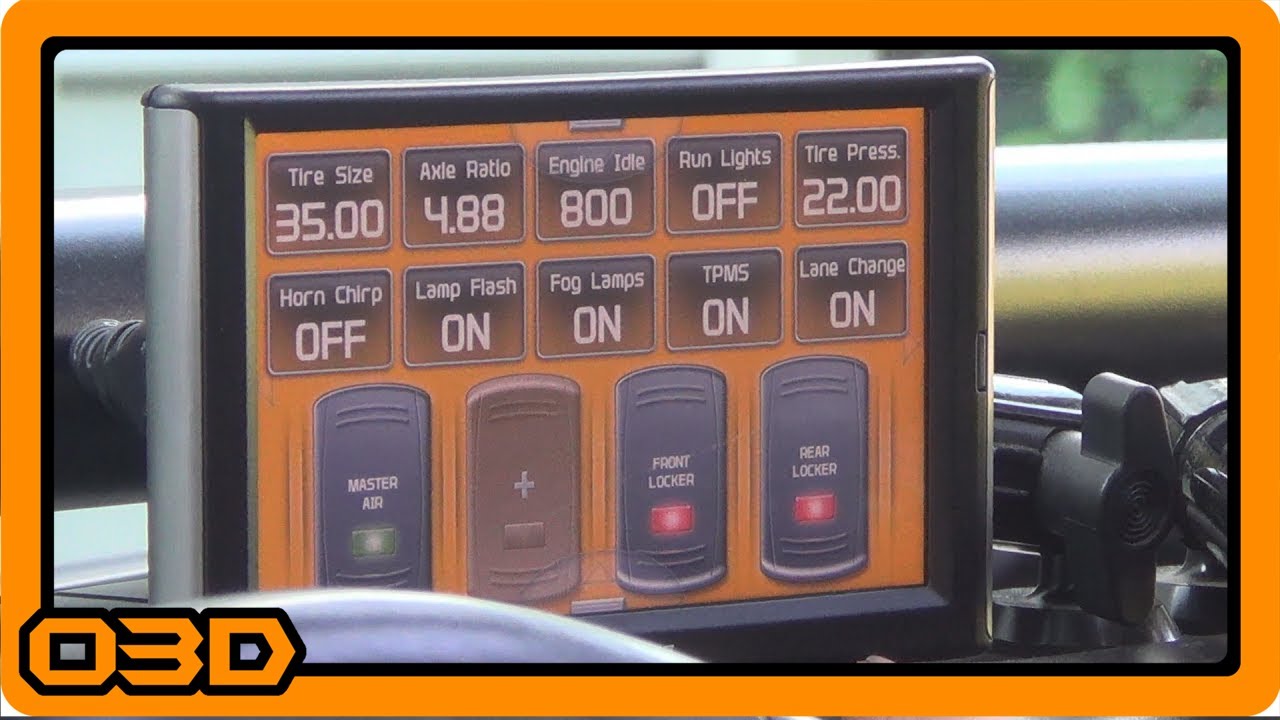
Superchips Trail Dash 2 (TD2) EAS Switch Wiring and Programming for ARB OBA
July 9, 2017
Learn to wire and program your Superchips Trail Dash 2 for ARB OBA and lockers in this detailed tutorial.
Quick Look
Overview
In the world of off-roading, having reliable control over your vehicle's systems can make all the difference between a smooth adventure and a frustrating day on the trails. One of the most popular tools for Jeep enthusiasts is the Superchips Trail Dash 2 (TD2), which not only enhances your Jeep's performance but also offers a smart way to manage additional accessories. In this article, we'll guide you through the process of wiring and programming virtual switches using the TD2 for your ARB Onboard Air (OBA) compressor and lockers, making sure you're ready for your next off-road journey.
What This Covers
This tutorial will take you step-by-step on:
- Wiring your ARB compressor and lockers to the TD2.
- Using EAS (Expandable Accessory System) adapters to create virtual switches.
- Programming these switches for practical use during off-road adventures.
Step-by-Step Breakdown
First things first, let's look at the wiring process:
- Preparing the Components: Ensure you have the Superchips TD2 and the necessary EAS adapters ready. Begin by reviewing your wire connectors and ensuring they are compatible with your ARB accessories.
- Planning Your Wiring: It's essential to map out how you want to configure the wiring for your air compressor and lockers. In this case, our setup includes a master switch for the compressor and individual switches for the front and rear lockers.
- Connecting Wires: Begin connecting the wires from the compressor and lockers to the EAS switch modules. It's important to keep the wiring as neat as possible to avoid any electrical issues later on. Use the TD2's wiring layout as a reference.
- Power Supply Setup: Connect your switches to the vehicle's power source, ensuring that they receive adequate power only when the key is in the 'on' position. Utilizing a tap from the fuse box is often the best strategy.
- Tidying Up: Once the initial connections are made, organize and secure your wiring with zip ties or electrical tape to prevent any accidents while you are out on the trails.
- Programming the TD2: After everything is wired up, turn on your Jeep, and access the TD2 interface. Follow the on-screen prompts to program your switches according to your preferences. You can customize the labels for each switch (e.g., 'Master Air', 'Front Locker', 'Rear Locker').
Helpful Tips
Here are some pointers to keep in mind while you're wiring and programming your TD2:
- Always double-check your connections before powering up the switches. A loose connection can lead to malfunctions.
- Take your time with the programming. It's easy to rearrange the switch order or modify their labels, so make it convenient for your needs.
- If you are unfamiliar with wiring, consider seeking advice from a professional to avoid any mistakes that could lead to electrical failures.
- Document your wiring layout and the programming sequence for future reference, especially if you plan to make adjustments later.
Key Takeaways
Wiring and programming the Superchips Trail Dash 2 to control your ARB onboard air compressor and lockers provides a more organized and efficient way to operate your off-road accessories. With virtual switches at your disposal, you can streamline your setup and minimize the risk of accidental engagement. Follow the steps outlined here, and you'll be ready for your next adventure in no time!